

Documentation

Guides for each avionics product.

Install, update, and customize Cockpit Vector software for X-Plane. Each product has its own guide — pick the suite you are flying.

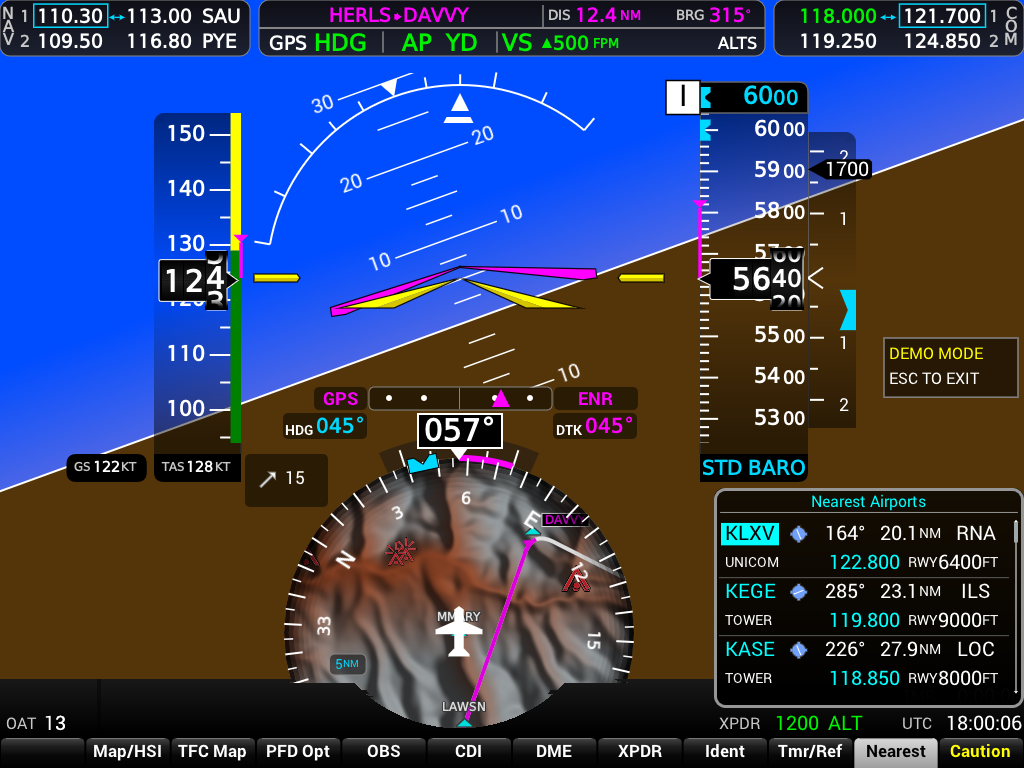
G1000 NXi Primary Flight Display Available

Cockpit Vector

G1000 NXi

Install the plugin and standalone displays, keep nav data current, and drop in aircraft assets — EIS, CAS, checklists, and boot logos.

  • Windows, macOS, and Linux installers
  • In-sim plugin and external PFD/MFD windows
  • Updates, nav data, weather, and traffic
  • Per-aircraft customization
GTN 750 Touchscreen navigator
Planned next

Cockpit Vector

GTN 750

Docs will land with the product — after the G1000 NXi suite reaches feature-complete.

  • Install and setup for the large-format GTN
  • Same plugin + standalone architecture as G1000 NXi
  • Not yet in development — roadmap item
Coming later
GTN 650 Compact touchscreen navigator
Planned

Cockpit Vector

GTN 650

Compact GTN sibling — documentation will follow the 750, sharing the same core software.

  • Same GTN page flow in a smaller bezel
  • Shares core GTN architecture with the 750
  • Not yet in development — roadmap item
Coming later

How do I get support?

Questions, bugs, or hangar talk — join the Cockpit Vector Discord. That is the public community for G1000 NXi and whatever comes next.

Independent reimplementations. Cockpit Vector products are unofficial simulation software. Product names that match real-world avionics are used only to identify the systems being replicated. Not affiliated with or endorsed by Garmin Ltd. · Free for noncommercial use only under the PolyForm Noncommercial License. Commercial use requires a separate license.